Mobile Credentials: Using Phones as Office Keys


Published: Oct 9, 2026

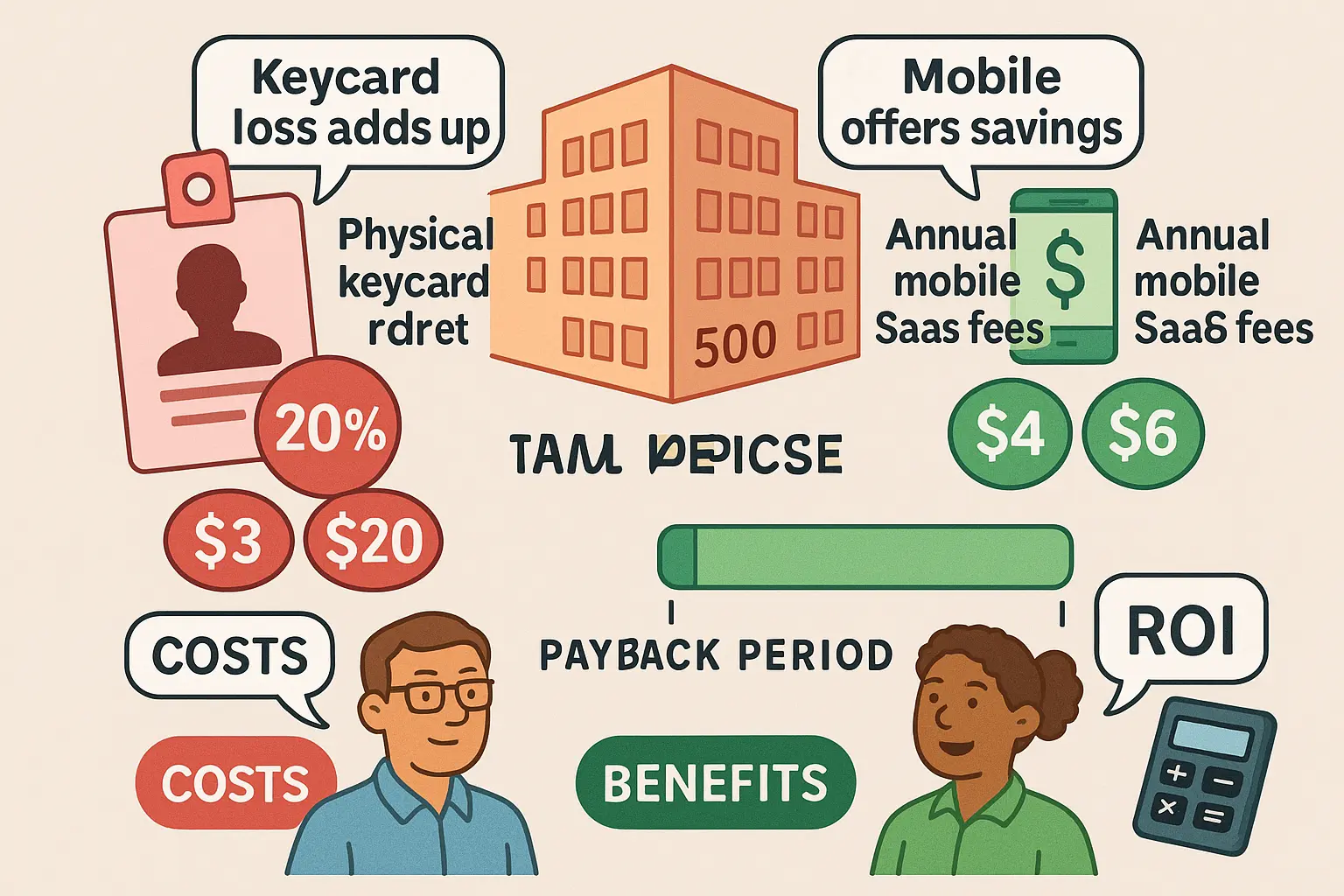
Traditional keycard and fob systems are slowly draining operations. IT directors and facility managers face a constant cycle of replacing lost hardware: over 20% of physical keycard users lose at least one card or fob annually. Standard proximity cards cost $3 to $10, while high-security smart cards can run up to $20 each. For a 500-employee company, that means a direct hardware drain of up to $2,000 annually, not counting administrative hours spent provisioning replacements.

No wonder over 70% of physical security professionals are prioritizing mobile or hybrid credentials in their three-year roadmaps. But how do you execute this migration without breaking your budget, triggering employee privacy complaints, or suffering from network outages?
Deep-Dive Comparison: NFC vs. Bluetooth Low Energy (BLE)


Selecting the right communication protocol dictates your overall user experience and security posture. Mobile credentials rely on two primary technologies: Near Field Communication (NFC) and Bluetooth Low Energy (BLE).

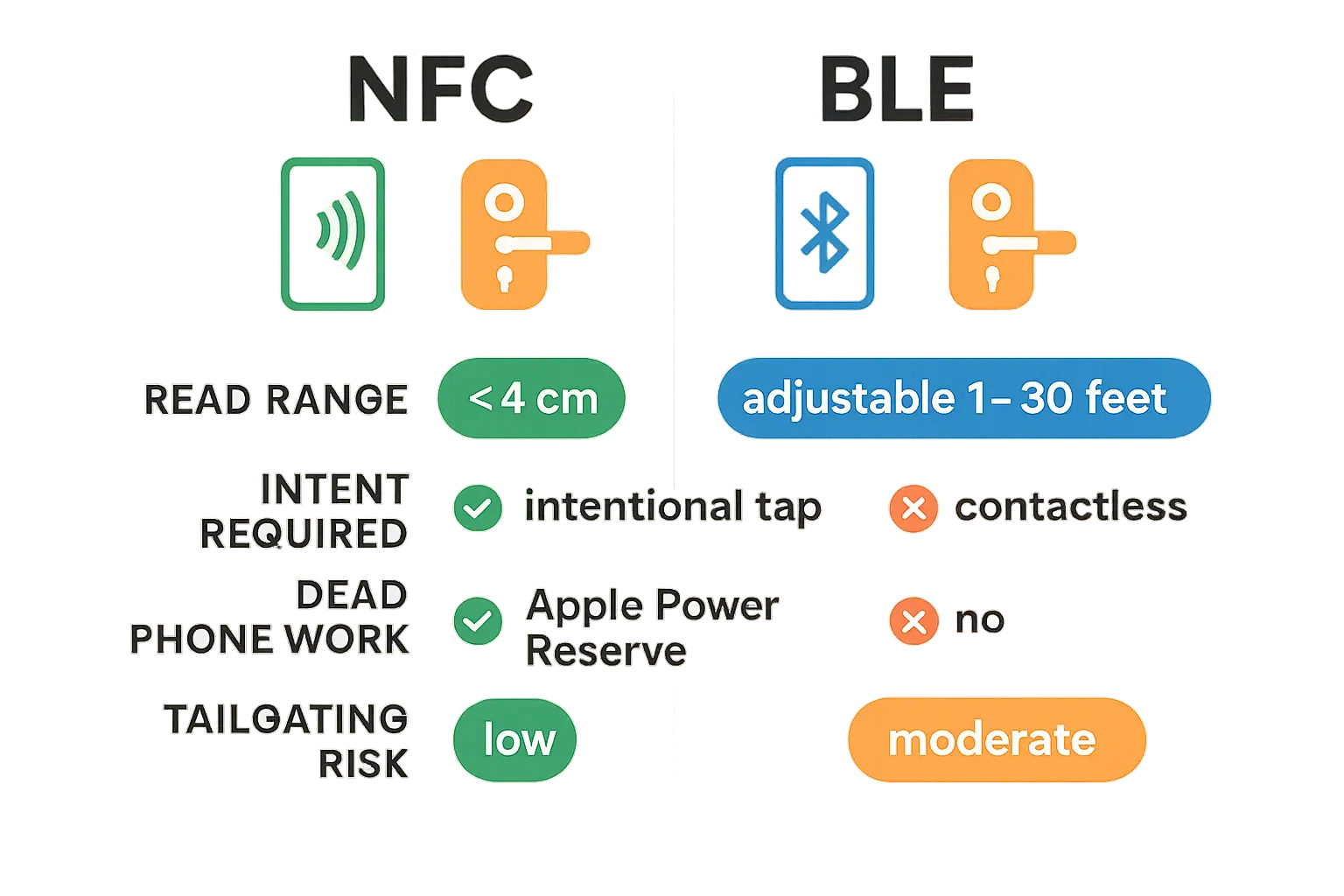
NFC restricts the read range to under 4 centimeters, requiring an intentional “tap” to unlock a door. While this close-range requirement makes NFC highly secure and virtually immune to accidental unlocks, third-party NFC integrations on iOS face restrictive sandbox limitations.

Conversely, BLE has a broad range of up to 30 feet, enabling hands-free background unlocking. However, without careful software calibration, this creates “room-hop” and tailgating risks—a manager sitting 15 feet from a locked door could accidentally trigger an unlock. Security teams must calibrate Received Signal Strength Indicator (RSSI) thresholds within their reader software to ensure doors only unlock when the device is within a designated path.

This visual clarifies the fundamental differences between NFC and BLE mobile credential technologies, helping decision makers grasp which protocol suits their office security needs.

The BYOD Privacy Playbook (Employee Friction)


Deploying a Bring Your Own Device (BYOD) model often causes immediate pushback from employees worried about continuous GPS tracking. HR and IT departments must proactively address this concern.

Modern access control apps only utilize local Bluetooth and NFC signals to communicate with the door reader. They do not track, log, or transmit continuous location coordinates. Providing clear, transparent documentation to staff explaining this distinction helps eliminate implementation friction.

Retrofitting Existing Infrastructure: Avoid the "Rip-and-Replace"


Transitioning to a modern smartphone-based entry system does not require you to scrap your entire physical ecosystem. You can easily integrate multi-tech readers that support both legacy prox cards and mobile credentials directly into your existing legacy controllers via Wiegand or OSDP (Open Supervised Device Protocol). This unified setup allows a hybrid migration path, keeping physical fobs active for temporary visitors while onboarding permanent staff onto mobile devices.

Implementing these setups is standard practice when planning the future of access control for growing organizations. Multi-technology readers also lay the groundwork for adding physical layers down the line, such as integrating high-security biometric door locks for business properties. Whether securing an entire facility or tailoring keyless entry systems for small business use, phased retrofitting balances budgets while immediately improving site security.

Hard-Number ROI Calculator (Interactive Widget)


The primary financial benefit of mobile access control is the dramatic drop in card replacement overhead. While cloud access management features an ongoing Software-as-a-Service (SaaS) subscription fee, eliminating standard card purchasing, administrative provisioning labor, and overnight shipping costs results in a highly predictable payback period.

This visual anchors key financial insights by illustrating the cost tradeoffs and payback timeline of transitioning from lost physical cards to mobile credentials.

Frequently Asked Questions


Are mobile keys secure?

Yes. Unlike legacy 125kHz physical proximity cards, which are highly vulnerable to cloning devices, mobile credentials utilize dynamic challenge-response handshakes secured by modern AES-128/256 encryption.

How do you revoke access for a terminated employee?

Administrators can instantly deactivate credentials over-the-air (OTA) via a cloud dashboard. This immediately updates the edge controller database, removing the user’s access rights without needing to retrieve physical hardware.

Do mobile keys work on Android and iPhone equally?

Yes, modern platforms support both operating systems. While Android devices offer greater native flexibility with background NFC operations, iPhones leverage the highly secure Apple Wallet integration with Power Reserve capabilities to provide frictionless access.

Need more information? Get a free quote

Call us now

Get A Free Call From Our Experts!

Floating Button Form